In your dashboard
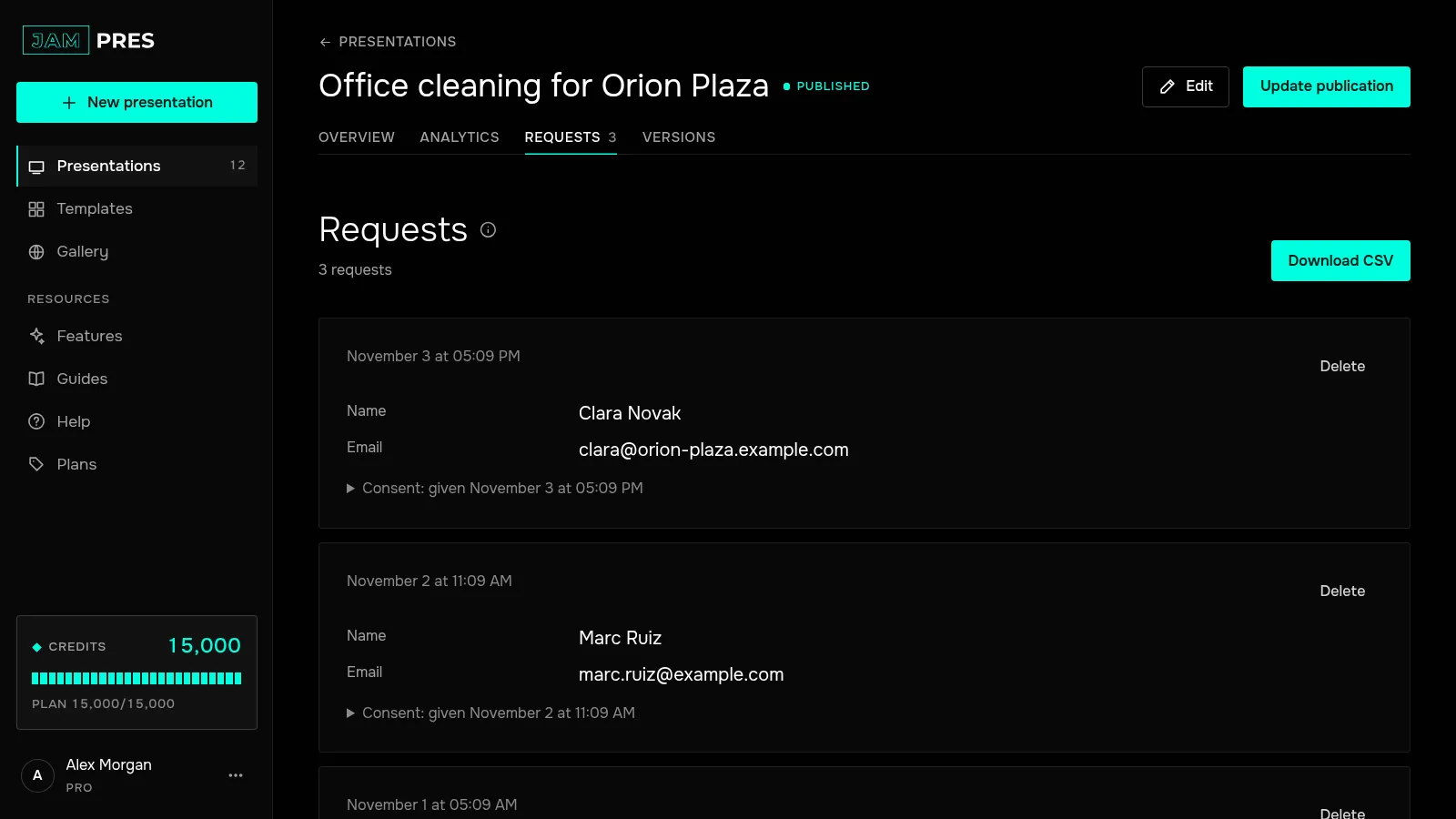
Open the presentation and go to the “Requests” tab, which shows a counter. Each request has the date and time, the answers by field, and the consent the person gave. The total is also shown in the “Publication” panel on the presentation page.
Requests are visible to the owner and to collaborators with the “Can edit” role. Only the owner can remove a request, with “Delete” — for example, when someone asks you to erase their data. The same tab holds poll results and the “Download CSV” button; see exporting to CSV.
In your inbox
Right after a form is sent, the presentation's owner gets a “New request” email with the answers and an “All requests” button. Collaborators don't get these emails.
- The email language is set under “Email language” in “Account” → “Settings”.
- To stop these emails, use the “Form leads” switch in the “Emails” section there, or the “Unsubscribe from request emails” link in the email itself.
- If one presentation gets more than twenty requests in an hour, the rest of that hour's requests don't come by email. All of them are saved in the dashboard.
If your plan ends
The form stops accepting new requests: instead of the button, viewers see “This form isn't accepting requests right now.” The page keeps working, and collected requests stay under the “Requests” tab — you can view and export them on any plan.